Background
GA4 has finally got a native hostname filter.
It’s something Universal Analytics (UA) had from the start and was sorely missed in GA4. Good news though – as of June 2026 it’s available within the Data Filters section of the Admin settings.
What It Does
Every event sent to GA4 carries a hostname – ie, the domain it came from. The new filter lets you exclude events where that hostname matches a value you specify.
To set one up, with in the GA4 console access the filter settings as follows: Admin > Data collection and modification > Data filters > Create Filter, then select the Web hostname traffic option. You name the filter, enter the hostname(s) you want to block and set it to either Testing or Active:
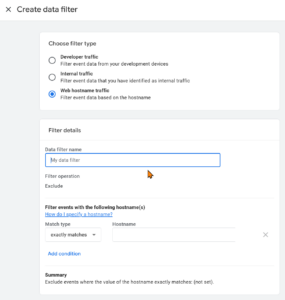
The Testing mode is worth using first. GA4 data filters are destructive: once active, any data matched by the filter is permanently dropped and can’t be recovered.
Crucially, in Testing mode, matching events are flagged with a “Test data filter name” dimension rather than being deleted, so you can check what would be caught before you commit.
The Limitations
There are a couple of significant limitations to this though. The filter is exclude only: there’s no include option, which means you can’t set a single filter that says “only accept data from these domains”. Frustratingly, you have to specify every domain you want to block, one at a time.
There’s also no regex support. This is a significant gap: whereas UA gave you regex and the ability to be granular in how you define your filters, this doesn’t. So, if your staging environment lives across several subdomains, or you want to build anything more nuanced than an exact hostname match, it’s a bit limiting.
Does It Fix Ghost Spam?
Only partially.
Ghost spam works by sending fake hits directly to GA4’s Measurement Protocol endpoint using your public Measurement ID, meaning the hits never touch your website or GTM at all. The native hostname filter can catch these if they carry a hostname you’ve excluded, but the exclude-only limitation means you’d be constantly adding new spam domains as they appear rather than maintaining a clean allowlist.
If you’re not sure whether ghost spam is affecting your property, run a free-form Exploration with Hostname as a dimension. Any sessions showing a hostname that isn’t yours or showing “(not set)” are worth investigating.
Summary
The GA4 Hostname data filter is a welcome addition, and long overdue.
However, without an include option or regex support it’s limited in practice and useful only for a fixed set of known hostnames, less so for anything more dynamic. Hopefully the include functionality arrives soon, as that would significantly improve it.
If you’d like to review your GA4 setup or aren’t sure whether your data is being affected by spam or staging traffic, get in touch and we can take a look.