On 1 July 2026, Google rolled out a redesigned Overview page inside Google Tag Manager, with a cleaner layout, collapsible navigation and a new visual event builder for setting up conversion tags by clicking directly on your website rather than configuring tags and triggers by hand.
On its own, this is a fairly modest UI tidy-up. What makes it worth paying attention to is the timing.
This is the first visible piece of a much bigger change Google announced back in May: GTM containers are being merged with the standalone Google tag, with your GA4, Google Ads and Floodlight tags moving into a new concept called “Destinations” inside the container itself. Today, each of those loads its own separate script. Under the new model, a single container script handles all of them, which should mean fewer scripts loading on your site and a genuine, if modest, page speed improvement for anyone running several Google products through GTM.
There’s a second layer to this worth flagging for admin-heavy teams: centralised settings. Once your tags live as Destinations, things like consent configuration and cross-domain measurement can be set once at the container level instead of being repeated (and potentially drifting out of sync) across every individual tag. Anyone who’s inherited a GTM container with five slightly different consent configurations will recognise why that matters.
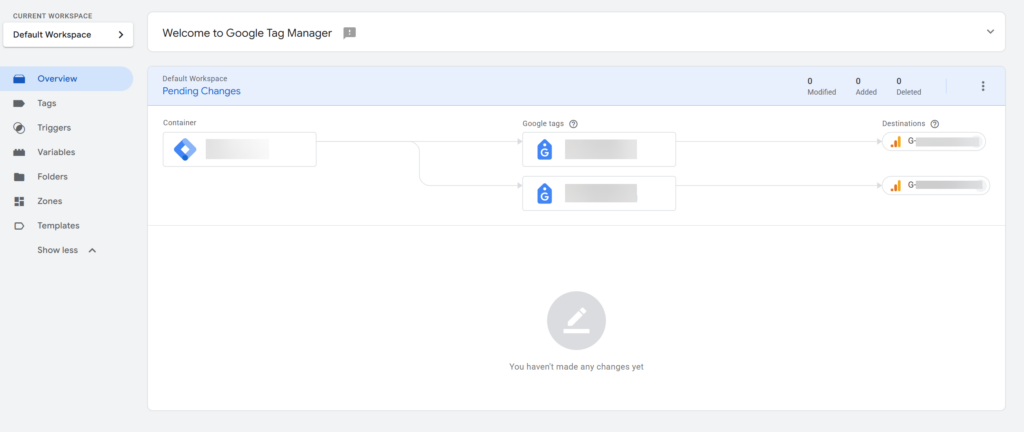
What’s actually live right now, versus what’s coming
It’s worth being precise about what this specific release covers.
The July 1 change is the interface groundwork, the new Overview layout and the event builder tool. The Destinations model and container merge that everything is building towards is a separate, opt-in upgrade that existing containers won’t be forced into. Nothing breaks today if you do nothing. That’s a sensible rollout approach from Google, and worth remembering if a client asks whether they need to act immediately. They don’t, yet.
The visual event builder is a mixed bag
The headline addition is a point-and-click overlay that opens on your live site, lets you click the elements that matter – a transaction total for example – and generates the tags and variables automatically.
That’s genuinely useful for lowering the barrier to setting up conversion tracking, particularly for non-technical marketers. But right now it’s limited to Google Ads purchase conversions only, so its usefulness for most teams is currently narrow. It’s also the kind of tool that’s easy to misuse: clicking together a tag without understanding what it’s actually capturing is how messy, undocumented GTM containers happen in the first place. Worth treating as a starting point to review, not a finished implementation to trust blindly.
Our take
This is a sensible, well-sequenced update rather than a flashy one. Google separating the visible interface change from the more consequential Destinations migration gives teams room to get comfortable before anything structural changes underneath them. The performance argument for Destinations is real and worth planning for, but there’s no rush: the standard advice holds here, let the early adopters find the edge cases first, then migrate a low-risk container to test the new flow before rolling it out everywhere. We’d treat the event builder the same way, useful to know about, not yet something to hand to junior team members without a second pair of eyes on the output. If you’d like any help with navigating the new look GTM, or would like an audit of your current set up, then please let us know.